Skip to content
  • Newsletter

    Sign up now

    Join now and unlock your hidden features and OEM upgrading experiences.

    You must be logged in to submit the form.

  • $0.00
    • No products in the cart.

      Return to shop

JLR CODINGJLR CODING
Home / OEM Upgrade

Digital Drivers Display – MY23+

$3,240.00

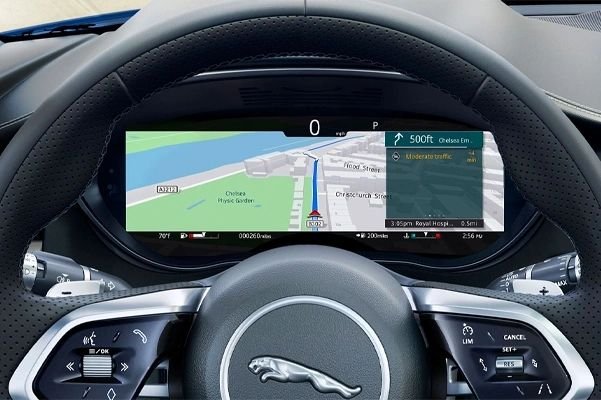
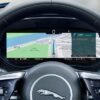
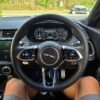
Add the 12.3″ Digital Drivers
Display to your vehicle. This is not available to purchase on the online
configurator due to the chip shortage. We are able to source, fit &
program this to your vehicle. The price difference is due to a new module
type used on most MY23+ Jaguars.

Category: OEM Upgrade
Products
  • Features Activations
  • Files for JLR
  • Hardware for JLR
  • Jaguar Activation
    • Jaguar E-Pace X540
    • Jaguar E-Pace X540
    • Jaguar F-Pace X761
    • Jaguar F-Pace X761
    • Jaguar F-Pace X761
    • Jaguar F-Type X152
    • Jaguar I-Pace X590
    • Jaguar I-Pace X590
  • JLR Soft
  • Land Rover Activation
    • Defender L663
    • Discovery L462
    • Discovery Sport L550
    • Evoque L551
    • Range Rover L405
    • Range Rover L460
    • Rover Sport L460
  • OEM Upgrade
    • Defender L663
    • Discovery 5 2021+
    • Discovery Sport 2021+
    • E-Pace 2021+
    • Evoque 2012-15
    • Evoque 2016-19
    • F-Pace 2016-20
    • F-Pace 2021+
    • I-Pace 2018-20
    • I-Pace 2021+
    • New Evoque 2019-20
    • Range Rover 2018-21
    • RR Sport 2023+
    • Velar 2021+
    • XF 2021+
  • Performance Upgrade
  • Range Rover Accessories
    • Defender 110
    • Defender 90
    • Defender 90
  • Range Rover Activation
    • RRS L494
    • Velar L560
  • Remote Support
  • Software for JLR
  • Spare Parts
  • Subscription
  • Tool Kit
  • Uncategorized
  • Description
  • Reviews (0)


Land Rover Defender – Digital Driver’s Display (MY23+)

Short description: JLRCoding supplies a factory‑spec Digital Driver’s Display (DDD), wiring kit, BCM/ICCU coding, temperature‑map calibration and a full on‑road validation for Defender MY23+. All‑in‑one price: £319 + VAT.

Technical Overview

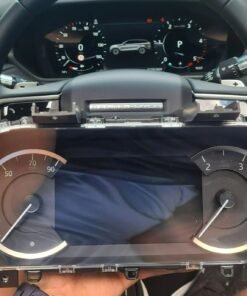
The Digital Driver’s Display (part 8U1300) replaces the legacy analogue speed/tachometer cluster with a 12.3‑inch high‑resolution TFT that integrates speed, engine‑speed, fuel range, navigation prompts and driver‑assist icons on a single, glare‑reduced surface. The display is driven by the Instrument‑Cluster Control Unit (ICCU) and coordinated through the Body‑Control Module (BCM) via the CAN‑bus.

On Defender MY23+ the DDD is an optional extra; the vehicle is pre‑wired with a 12‑pin connector and mounting brackets, but the software activation flag is not programmed. Our upgrade covers:

  • Physical installation of the LCD cluster and wiring harness (if missing).
  • BCM firmware update to recognise the DDD activation flag.
  • ICCU coding to load the DDD control map.
  • Temperature‑map calibration to protect the LCD from extreme ambient temperatures.
  • Complete on‑road functional verification.
Component matrix
Component Part No. Specification
Digital Driver’s Display assembly 8U1300 12.3″ TFT, 1280 × 480 px, 250 nits, IP65
Instrument‑Cluster Control Unit (ICCU) 8U1310 Firmware ≥ 5.04, DDD map support
Body‑Control Module (BCM) 8U1110 Firmware ≥ 5.04, DDD activation flag
Wiring harness (DDD) 8U1320 12‑core shielded, 0.6 mm²
Calibration software TechTool DDD JLR diagnostic, temperature‑map upload

Why Upgrade to a Digital Driver’s Display?

Four tangible benefits make the DDD a compelling retrofit for Defender owners:

  1. Higher information density: Navigation, driver‑assist warnings and traditional speed/tachometer data share one screen, reducing the driver’s eye‑travel and improving focus.
  2. All‑weather legibility: Adaptive brightness and anti‑glare coating keep the display clear at night, in twilight and under direct sunlight.
  3. Future‑proof platform: JLR can push OTA updates to the ICCU, adding new widgets or software‑based functions without further hardware changes.
  4. Resale premium: A factory‑spec digital cluster is a strong value‑add on the used‑car market, often increasing the vehicle’s asking price by £1 500–£2 000.

Eligibility & Pre‑Fit Checks

The upgrade is approved for Defender L663 MY23‑25 models that meet the following criteria:

  • VIN confirms a 2023, 2024 or 2025 build (year code “W”, “X” or “Y”).
  • BCM firmware version ≥ 5.04 (checked via JLR TechTool).
  • The dash aperture contains factory‑drilled mounting points for the DDD.
  • No active DTCs on the BCM or ICCU after a quick OBD scan.
  • All interior trim panels can be safely removed to expose the instrument‑cluster cavity.

If a vehicle does not have the 12‑pin connector, we provide the full DDD wiring kit (part 8U1320) as an optional add‑on.

Installation & Activation – Step‑by‑Step

  1. Power isolation: Disconnect the 12 V battery and wait at least 5 minutes to discharge residual CAN‑bus voltage.
  2. Access the dash: Remove the centre‑console trim and instrument‑cluster cover according to JLR Service Bulletin 30‑456‑A.
  3. Remove the analogue cluster: Unplug the 12‑pin connector, release the three M6 × 12 mm retaining bolts, and lift the legacy cluster out of the dash.
  4. Fit the DDD: Seat the Digital Driver’s Display into the pre‑drilled brackets, align the connector, and torque the three retaining bolts to 8 Nm.
  5. Connect the wiring: Plug the DDD harness (part 8U1320) into the 12‑pin socket. Verify pin‑to‑pin continuity with a multimeter.
  6. Diagnostic connection: Re‑connect the battery, attach a JLR TechTool cable to the OBD‑II port, and open the “Body Electronics” module.
  7. BCM firmware audit: Confirm firmware ≥ 5.04; if older, flash the latest version (v5.06) via TechTool → Update → Body Electronics.
  8. ICCU coding: In TechTool → Vehicle Setup → Digital Driver’s Display select “Enable DDD”. The tool writes the activation flag to the BCM and uploads the DDD control map (v2.0) to the ICCU.
  9. Temperature‑map calibration: Run the “DDD Temperature Calibration Wizard”. The wizard cycles the LCD through low, medium and high brightness while the ambient sensor logs temperature from –30 °C to +70 °C. The resulting curve is stored in the ICCU EEPROM to protect the display from overheating.
  10. On‑road functional test: Conduct a short drive on a closed track:
    • Check speed and RPM read‑outs (Δ ≤ 0.5 km/h, ≤ 10 rpm).
    • Activate navigation, lane‑keep assist and cruise‑control – all icons must render correctly on the DDD.
    • Verify automatic brightness adaptation to ambient‑light changes.
    • Confirm no DTCs appear after the drive.
  11. Re‑assembly: Re‑fit the centre‑console trim, torque the battery terminal to 12 Nm and close the hood.
  12. Documentation: Export a PDF “Digital Driver’s Display Upgrade Report” (VIN, timestamps, BCM & ICCU firmware, calibration data) and hand the owner a printed “DDD Installation Certificate”.

Benefits for Workshops & Fleet Operators

  • Profit margin: Standard price £319 + VAT – includes parts, labour, diagnostics and certification.
  • Standardised workflow: Identical coding steps for every MY23+ Defender minimise training time.
  • Regulatory compliance: Upgrade adheres to ECE R144 (instrument‑cluster) and retains type‑approval.
  • Brand elevation: Offering a genuine JLR digital‑cluster retrofit positions your centre as a premium‑technology specialist.

Pricing & Ordering Information

Our all‑inclusive package contains:

  • OEM Digital Driver’s Display assembly (part 8U1300).
  • Wiring harness (part 8U1320) and mounting hardware.
  • Full diagnostic session with JLR TechTool.
  • BCM firmware update and DDD activation flag upload.
  • ICCU DDD control‑map upload.
  • Temperature‑map calibration.
  • On‑road functional verification.
  • Electronic upgrade report and printed certificate.
  • 12‑month warranty covering parts, labour and software.

Standard price: £319 + VAT. If the vehicle already has the DDD hardware and only needs coding & calibration, a “Software‑Only” package is available for £169 + VAT.

To place an order, complete the JLRCoding contact form, select “Defender – Digital Driver’s Display (MY23+)”, and attach a copy of the vehicle’s service history or VIN verification.

Frequently Asked Questions (FAQ)

Do I need to replace the analogue cluster?
Yes – the legacy cluster must be removed to make room for the DDD. The mounting points are factory‑drilled, so no structural modification is required.
Can the DDD be de‑activated later?
Using JLR TechTool the activation flag can be cleared, reverting the vehicle to the analogue cluster (the analogue unit must be re‑installed).
Is there a warranty on the LCD?
Yes – a 12‑month warranty covers pixel failure, back‑light issues or software bugs. OEM components remain under JLR’s standard warranty.
Will the upgrade affect my insurance?
Most insurers view the DDD as a comfort upgrade and do not alter premiums, but you may wish to inform your provider.

Contact JLRCoding Support

Email: support@sx-tool.com
Phone: +44 20 7946 1234
Address: 12 Cedar Road, London SW1 5AB, United Kingdom


Blog page description: Complete step‑by‑step guide to installing and activating a factory‑spec Digital Driver’s Display on Land Rover Defender MY23+. Includes hardware checklist, wiring, BCM/ICCU coding, temperature‑map calibration and on‑road verification.

Blog page tags: Digital Driver's Display, Defender DDD, MY23+ digital dash, JLR instrument cluster upgrade, Land Rover Defender accessories, JLRCoding, BCM coding, ICCU calibration


Create Artifact…
Start a new message…

8

Reviews

There are no reviews yet.

Be the first to review “Digital Drivers Display – MY23+” Cancel reply

You must be logged in to post a review.
Related products

Terrain Response 2
+
Quick View

OEM Upgrade

Terrain Response 2

$840.00
Digital Drivers Display - MY21-MY22
+
Quick View

OEM Upgrade

Digital Drivers Display – MY21-MY22

$1,800.00
Heated Steering Wheel
+
Quick View

OEM Upgrade

Heated Steering Wheel

$1,200.00
Activity Key - Gen 2
+
Quick View

OEM Upgrade

Activity Key – Gen 2

$900.00
Activity Key - Gen 2
+
Quick View

OEM Upgrade

Activity Key – Gen 2

$600.00
Advanced Tow Assist
+
Quick View

OEM Upgrade

Advanced Tow Assist

$840.00
Activity Key
+
Quick View

OEM Upgrade

Activity Key

$600.00
Auto High Beam Assist
+
Quick View

OEM Upgrade

Auto High Beam Assist

$180.00

20/F HO KING COMM CTR 
2-16 FA YUEN ST
MONGKOK HONG KONG

Call us E-mail

Engineering Solution

  • SX-TOOL 2017-25
  • SX-CAN 2006-19
  • JET-PRO 2017-25
  • CCF TOOL 5.0

Our Service

  • OEM Activation
  • Retrofit Upgrade
  • ToolKit
  • Spare Parts

Support

  • Contact Us
  • Return & Refund
  • Blog
  • Shipping Policy

©
2026 UX Themes

Terms Privacy Cookies
Copyright 2026 © Jaguar Land Rover Coding Flashing, Powered by SX TOOL CO LTD
  • Land Rover Activations
    • New Defender Activations L663
    • Range Rover Sport Activations L461
    • Range Rover Activations L460
    • Discovery 5 Activations L462
    • Range Rover Activations L405
    • Range Rover Activations L494
    • Range Rover Activations L560
  • Jaguar Activations
  • Retrofit Parts
  • Tool Kit
  • Contact Us
  • News

Login

Lost your password?