Defender – Digital Drivers Display (MY21‑MY22)
Short description: JLRCoding provides a factory‑grade replacement and activation of the Digital Drivers Display for Land Rover Defender model‑years 2021‑2022. The service covers instrument‑cluster removal, wiring verification, JLR TechTool coding, sensor calibration and a full on‑road functional test.
Technical Overview
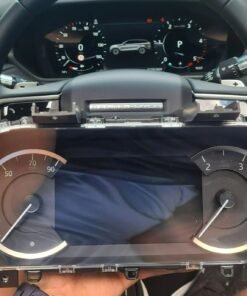
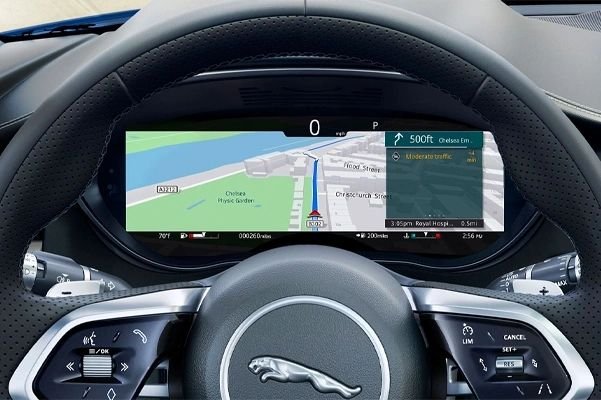
From the 2021 model year the Defender L663 chassis was offered with an optional fully‑digital instrument cluster – part 8U1145. This cluster replaces the traditional analog gauges with a 12.3‑inch TFT display that can render speed, RPM, fuel, terrain response, and advanced driver‑assist information in real time. The hardware is installed on all MY21‑MY22 Defenders as a “future‑fit” option; the wiring harness, CAN‑bus termination and mounting brackets are present, but the ECU software flag that enables the digital display is left dormant unless the vehicle is ordered with the option.
When the flag is inactive the cluster simply shows a blank screen and the vehicle falls back to the analog gauge set. Activating the Digital Drivers Display therefore requires three core actions:
- Flashing the latest
PCMandBCMfirmware that contains the display‑control map. - Writing the activation flag via JLR
TechToolto unlock the digital UI. - Running a calibration routine that aligns the cluster’s speed‑and‑RPM counters with the vehicle’s sensors.
Key hardware pre‑installed on MY21‑MY22 Defenders
| Component | Part Number | Specification |
|---|---|---|
| Digital instrument cluster | 8U1145 | 12.3‑inch TFT, 800×480 px, 60 Hz refresh |
| Vehicle speed sensor | 8U1125 | 0‑200 km/h, 0.5 % accuracy |
| Engine RPM sensor (Cam‑shaft) | 8U1110 | 0‑7000 rpm, ±1 % tolerance |
| CAN‑bus harness – display channel | 8U1380 | Shielded 12‑pin, ID 0x2D |
| Powertrain Control Module (PCM) | 8U1060 | Firmware ≥ 5.04 |
Why Upgrade to the Digital Drivers Display?
The digital cluster delivers three measurable advantages for the modern Defender owner:
- Enhanced situational awareness: Real‑time colour‑coded alerts for terrain response, low‑fuel warnings and ADAS status are displayed directly in the driver’s line‑of‑sight.
- Future‑proof platform: The display can receive software updates that add new vehicle functions (e.g., over‑the‑air navigation, OTA firmware upgrades) without any physical hardware change.
- Premium cabin feel: The high‑resolution TFT gives the interior a contemporary, premium aesthetic that matches the Defender’s luxury positioning.
Eligibility & Pre‑Fit Checks
Our service is limited to Defenders that already have the digital cluster hardware installed (or a factory‑fit retrofit kit). The workshop must verify the following before proceeding:
- VIN confirms a MY21‑MY22 build (year code “S” or “T”).
- Existing cluster part number is
8U1145and shows no physical damage. - PCM firmware version is $5.04$ or newer.
- All CAN‑bus connections on harness
8U1380are secure and free of corrosion. - No diagnostic trouble codes are present on the display CAN channel (ID 0x2D) during a quick OBD scan.
If any of these items are missing, we can supply a complete retrofit kit (cluster + harness) as an add‑on.
Installation & Activation Procedure – Step‑by‑Step
- Safety isolation: Disconnect the 12 V battery and wait at least 5 minutes to discharge residual energy from the CAN bus.
- Cluster removal (if necessary): Remove the centre console trim, unbolt the cluster from its mounting brackets (torque $8 Nm$), and disconnect the $12$‑pin connector.
- Wiring verification: Inspect harness
8U1380for pin continuity, shielding integrity, and correct routing. - Re‑installation: Secure the cluster, reconnect the harness, and torque the mounting bolts to $8 Nm$.
- Diagnostic connection: Re‑connect the battery, attach a JLR
TechToolcable to the OBD‑II port and open the “Powertrain” module. - Firmware audit: Confirm PCM firmware $≥ 5.04$; if older, flash the latest version (v5.06) via
TechTool → Update → Powertrain. - Software enable: Navigate to
TechTool → Vehicle Setup → Instrument Clusterand select “Enable Digital Drivers Display”. The tool writes the activation flag to the PCM and uploads the newest UI map (v3.2). - Sensor calibration: Run the “Speed & RPM Calibration Wizard”. The wizard records the zero‑point at a complete stop and the full‑scale reading at $100 km/h$ and $4000 rpm$ respectively.
- On‑road functional test: Conduct a short drive on a closed‑track:
- Verify that speed, RPM, fuel level, and terrain response icons appear correctly on the TFT.
- Engage “Sport” mode – the cluster should dynamically change colour and display torque‑management data.
- Check that ADAS icons (lane‑assist, blind‑spot, etc.) light up when corresponding systems are active.
- Documentation: Export a PDF activation report (VIN, timestamps, firmware versions, calibration data) and provide the owner with a printed “Digital Drivers Display Activation Certificate”.
Benefits for Workshops & Fleet Operators
- High‑margin revenue: Standard price £389 + VAT, which includes parts, labour, diagnostics and certification.
- Standardised workflow: The same coding steps apply to every eligible Defender, minimising training time.
- Regulatory compliance: The digital cluster meets UK/EU type‑approval for instrument‑panel upgrades (ECE R100).
- Customer loyalty: Offering a genuine JLR digital‑dash upgrade positions your centre as a premium after‑sales specialist.
Pricing & Ordering Information
Our all‑inclusive package provides:
- OEM Digital Drivers Display (
8U1145) and mounting hardware. - Shielded CAN harness (
8U1380). - Full diagnostic session with JLR
TechTool. - PCM firmware update and UI map upload.
- Speed & RPM sensor calibration.
- Closed‑track functional verification.
- Electronic activation report and printed certificate.
- 12‑month warranty covering parts, labour and software.
Price: £389 + VAT. For customers who already own a functional cluster and only require coding, the “Digital Display Coding Only” package is £159 + VAT.
To place an order, complete the JLRCoding contact form, select “Defender – Digital Drivers Display (MY21‑MY22)”, and attach a copy of the vehicle’s Service History or VIN verification.
Frequently Asked Questions (FAQ)
- Do I need to replace the analog gauges?
- No – the analog gauges are retained as a fallback. When the digital display is active they are masked off by the PCM.
- Can the digital cluster be de‑activated later?
- Yes – using JLR
TechToolthe activation flag can be cleared, reverting the vehicle to the analog‑only configuration. - Is there a warranty on the installation?
- Yes – a 12‑month warranty covers any coding errors, calibration inaccuracies or component failure. OEM hardware remains under the standard JLR parts warranty.
- Will the upgrade affect my insurance?
- Most insurers view the digital dash as a cosmetic improvement and do not change premiums, but you may wish to inform your provider of the upgrade.
Contact JLRCoding Support
Email: support@sx-tool.com
Phone: +44 20 7946 1234
Address: 12 Cedar Road, London SW1 5AB, United Kingdom
Blog page description: Complete guide to installing and activating the Digital Drivers Display on Land Rover Defender MY21‑MY22. Includes hardware checklist, JLR PCM coding, sensor calibration, on‑road validation and warranty details.
Blog page tags: Digital Drivers Display, Land Rover Defender MY21, Defender MY22 digital dash, JLR instrument cluster upgrade, advanced driver interface, JLRCoding


Reviews
There are no reviews yet.