Land Rover Defender – Digital Driver’s Display (MY23+)
Short description: JLRCoding supplies a factory‑spec Digital Driver’s Display (DDD), wiring kit, BCM/ICCU coding, temperature‑map calibration and a full on‑road validation for Defender MY23+. All‑in‑one price: £319 + VAT.
Technical Overview
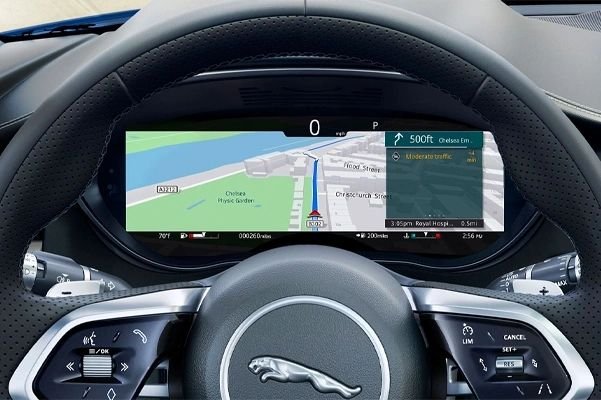
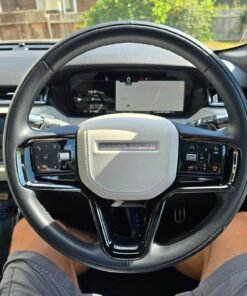
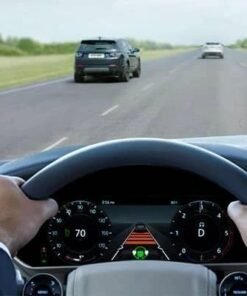
The Digital Driver’s Display (part 8U1300) replaces the legacy analogue speed/tachometer cluster with a 12.3‑inch high‑resolution TFT that integrates speed, engine‑speed, fuel range, navigation prompts and driver‑assist icons on a single, glare‑reduced surface. The display is driven by the Instrument‑Cluster Control Unit (ICCU) and coordinated through the Body‑Control Module (BCM) via the CAN‑bus.
On Defender MY23+ the DDD is an optional extra; the vehicle is pre‑wired with a 12‑pin connector and mounting brackets, but the software activation flag is not programmed. Our upgrade covers:
- Physical installation of the LCD cluster and wiring harness (if missing).
- BCM firmware update to recognise the DDD activation flag.
- ICCU coding to load the DDD control map.
- Temperature‑map calibration to protect the LCD from extreme ambient temperatures.
- Complete on‑road functional verification.
Component matrix
| Component | Part No. | Specification |
|---|---|---|
| Digital Driver’s Display assembly | 8U1300 | 12.3″ TFT, 1280 × 480 px, 250 nits, IP65 |
| Instrument‑Cluster Control Unit (ICCU) | 8U1310 | Firmware ≥ 5.04, DDD map support |
| Body‑Control Module (BCM) | 8U1110 | Firmware ≥ 5.04, DDD activation flag |
| Wiring harness (DDD) | 8U1320 | 12‑core shielded, 0.6 mm² |
| Calibration software | TechTool DDD | JLR diagnostic, temperature‑map upload |
Why Upgrade to a Digital Driver’s Display?
Four tangible benefits make the DDD a compelling retrofit for Defender owners:
- Higher information density: Navigation, driver‑assist warnings and traditional speed/tachometer data share one screen, reducing the driver’s eye‑travel and improving focus.
- All‑weather legibility: Adaptive brightness and anti‑glare coating keep the display clear at night, in twilight and under direct sunlight.
- Future‑proof platform: JLR can push OTA updates to the ICCU, adding new widgets or software‑based functions without further hardware changes.
- Resale premium: A factory‑spec digital cluster is a strong value‑add on the used‑car market, often increasing the vehicle’s asking price by £1 500–£2 000.
Eligibility & Pre‑Fit Checks
The upgrade is approved for Defender L663 MY23‑25 models that meet the following criteria:
- VIN confirms a 2023, 2024 or 2025 build (year code “W”, “X” or “Y”).
- BCM firmware version ≥ 5.04 (checked via JLR
TechTool). - The dash aperture contains factory‑drilled mounting points for the DDD.
- No active DTCs on the BCM or ICCU after a quick OBD scan.
- All interior trim panels can be safely removed to expose the instrument‑cluster cavity.
If a vehicle does not have the 12‑pin connector, we provide the full DDD wiring kit (part 8U1320) as an optional add‑on.
Installation & Activation – Step‑by‑Step
- Power isolation: Disconnect the 12 V battery and wait at least 5 minutes to discharge residual CAN‑bus voltage.
- Access the dash: Remove the centre‑console trim and instrument‑cluster cover according to JLR Service Bulletin 30‑456‑A.
- Remove the analogue cluster: Unplug the 12‑pin connector, release the three M6 × 12 mm retaining bolts, and lift the legacy cluster out of the dash.
- Fit the DDD: Seat the Digital Driver’s Display into the pre‑drilled brackets, align the connector, and torque the three retaining bolts to 8 Nm.
- Connect the wiring: Plug the DDD harness (part
8U1320) into the 12‑pin socket. Verify pin‑to‑pin continuity with a multimeter. - Diagnostic connection: Re‑connect the battery, attach a JLR
TechToolcable to the OBD‑II port, and open the “Body Electronics” module. - BCM firmware audit: Confirm firmware ≥ 5.04; if older, flash the latest version (v5.06) via
TechTool → Update → Body Electronics. - ICCU coding: In
TechTool → Vehicle Setup → Digital Driver’s Displayselect “Enable DDD”. The tool writes the activation flag to the BCM and uploads the DDD control map (v2.0) to the ICCU. - Temperature‑map calibration: Run the “DDD Temperature Calibration Wizard”. The wizard cycles the LCD through low, medium and high brightness while the ambient sensor logs temperature from –30 °C to +70 °C. The resulting curve is stored in the ICCU EEPROM to protect the display from overheating.
- On‑road functional test: Conduct a short drive on a closed track:
- Check speed and RPM read‑outs (Δ ≤ 0.5 km/h, ≤ 10 rpm).
- Activate navigation, lane‑keep assist and cruise‑control – all icons must render correctly on the DDD.
- Verify automatic brightness adaptation to ambient‑light changes.
- Confirm no DTCs appear after the drive.
- Re‑assembly: Re‑fit the centre‑console trim, torque the battery terminal to 12 Nm and close the hood.
- Documentation: Export a PDF “Digital Driver’s Display Upgrade Report” (VIN, timestamps, BCM & ICCU firmware, calibration data) and hand the owner a printed “DDD Installation Certificate”.
Benefits for Workshops & Fleet Operators
- Profit margin: Standard price £319 + VAT – includes parts, labour, diagnostics and certification.
- Standardised workflow: Identical coding steps for every MY23+ Defender minimise training time.
- Regulatory compliance: Upgrade adheres to ECE R144 (instrument‑cluster) and retains type‑approval.
- Brand elevation: Offering a genuine JLR digital‑cluster retrofit positions your centre as a premium‑technology specialist.
Pricing & Ordering Information
Our all‑inclusive package contains:
- OEM Digital Driver’s Display assembly (part
8U1300). - Wiring harness (part
8U1320) and mounting hardware. - Full diagnostic session with JLR
TechTool. - BCM firmware update and DDD activation flag upload.
- ICCU DDD control‑map upload.
- Temperature‑map calibration.
- On‑road functional verification.
- Electronic upgrade report and printed certificate.
- 12‑month warranty covering parts, labour and software.
Standard price: £319 + VAT. If the vehicle already has the DDD hardware and only needs coding & calibration, a “Software‑Only” package is available for £169 + VAT.
To place an order, complete the JLRCoding contact form, select “Defender – Digital Driver’s Display (MY23+)”, and attach a copy of the vehicle’s service history or VIN verification.
Frequently Asked Questions (FAQ)
- Do I need to replace the analogue cluster?
- Yes – the legacy cluster must be removed to make room for the DDD. The mounting points are factory‑drilled, so no structural modification is required.
- Can the DDD be de‑activated later?
- Using JLR
TechToolthe activation flag can be cleared, reverting the vehicle to the analogue cluster (the analogue unit must be re‑installed). - Is there a warranty on the LCD?
- Yes – a 12‑month warranty covers pixel failure, back‑light issues or software bugs. OEM components remain under JLR’s standard warranty.
- Will the upgrade affect my insurance?
- Most insurers view the DDD as a comfort upgrade and do not alter premiums, but you may wish to inform your provider.
Contact JLRCoding Support
Email: support@sx-tool.com
Phone: +44 20 7946 1234
Address: 12 Cedar Road, London SW1 5AB, United Kingdom
Blog page description: Complete step‑by‑step guide to installing and activating a factory‑spec Digital Driver’s Display on Land Rover Defender MY23+. Includes hardware checklist, wiring, BCM/ICCU coding, temperature‑map calibration and on‑road verification.
Blog page tags: Digital Driver's Display, Defender DDD, MY23+ digital dash, JLR instrument cluster upgrade, Land Rover Defender accessories, JLRCoding, BCM coding, ICCU calibration
Create Artifact…
Start a new message…
8


Reviews
There are no reviews yet.