Sign up now
Join now and unlock your hidden features and OEM upgrading experiences.
You must be logged in to submit the form.

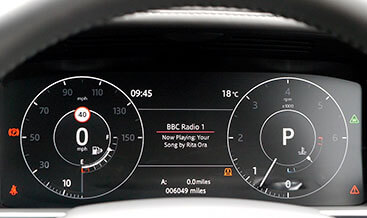
Interactive Driver Display (TFT cluster)
Interactive Driver Display (TFT cluster) delivers OEM‑spec high‑resolution 12.3‑inch digital instrument functionality for DOIP‑based JLR Defender L663 vehicles. However, many base‑trim Defender models ship with restricted partial‑display instrument hardware, or contain physical TFT hardware locked down via factory CCF trim‑level settings. As a result, drivers miss custom gauge layouts, full‑screen in‑cluster navigation and rich ADAS status graphics. If you build a complete driver‑assist suite, pair this retrofit with our Adaptive Cruise Control with Stop Go. It unlocks comprehensive ADAS graphic feedback directly on your digital instrument panel. This kit supplies genuine OEM TFT IPC instrument‑panel‑cluster hardware plus required LVDS wiring harness. In turn, it unlocks configurable virtual dials, embedded map view and Terrain‑Response animated graphics within the driver’s primary line‑of‑sight display.
First of all, full interactive TFT‑cluster features will not activate from a simple hardware swap alone. Next, technicians fit or replace the IPC TFT unit, install LVDS signal harnesses and verify dashboard connector integrity. After that, our jlrcoding team runs a full DOIP diagnostic scan. We enable interactive‑driver‑display feature flags inside the CCF file. Furthermore, we also complete parameter adaptation for IPC, IAM, BCM and DADC modules. Once coding finishes, the system supports steering‑wheel‑controlled view switching. Meanwhile, it also enables in‑cluster navigation rendering and ADAS warning pop‑ups. For this reason, check our Head‑Up Display if you want duplicated projected driver information onto the windscreen.
This retrofit supplies OEM high‑resolution TFT IPC instrument‑cluster unit, LVDS graphics harness, vehicle‑specific wiring pigtails and all required mounting fasteners. The IPC processes powertrain data, navigation frames and ADAS event inputs. Subsequently, status and graphic‑data signals travel over CAN‑FD bus to IAM, BCM and DADC modules. Once configured, users toggle between multiple virtual‑gauge layouts via steering‑wheel scroll controls. The cluster can render full‑screen navigation maps, media playback info and Terrain‑Response mode animations. Notably, all display behaviour strictly matches original JLR factory specifications. Even so, after complete mechanical fitment, advanced TFT‑display functions remain inactive. Rather, they only work after approved DOIP multi‑module programming plus IPC network‑synchronisation calibration. Finally, you can combine this driver‑information upgrade with Apple CarPlay and Android Auto Pack to show smartphone media metadata on the TFT cluster screen.
This Interactive Driver Display (TFT cluster) retrofit suits 2020+ Defender L663 90, 110 and 130 models. The vehicle must support IPC TFT hardware mounting and compatible LVDS signal architecture. Therefore, send us your VIN first. We check firmware versions on IPC, IAM, BCM and DADC before dashboard teardown work starts.
Local work includes partial dashboard trim removal and original instrument‑cluster dismounting. Technicians install the genuine TFT IPC unit and route LVDS harness connections. In some cases, base vehicles need supplementary wiring upgrades to meet JLR high‑resolution‑signal requirements. When hardware is fitted, we save a backup copy of your original CCF. We activate the interactive‑driver‑display feature flags. Then, we run IPC network‑synchronisation and mileage‑preservation calibration. Last of all, we clear all instrument‑cluster‑related DTC fault codes.
You can pair local fitting with our worldwide remote coding service. Remote sessions require a DOIP‑VCI or Enet Type‑C cable. In short, follow the standard jlrcoding remote‑service workflow.
Every retrofit starts with a pre‑install health check and CCF backup. After coding, we verify layout‑switching response, map‑rendering performance and ADAS alert‑display behaviour. Importantly, hardware‑only TFT‑cluster fitment cannot enable fully compliant factory Interactive Driver Display functionality.
Otherwise, incomplete adaptation or poor LVDS configuration causes missing graphics or intermittent screen glitches. It may also store persistent IPC‑related DTC fault codes. Ultimately, once calibrated, this OEM upgrade improves driver‑information read‑out. It works well for highway commuters, family users and Defender overland‑focused owners.
XF 2021+
XF 2021+

XF 2021+
XF 2021+
XF 2021+
XF 2021+
XF 2021+
XF 2021+