Sign up now
Join now and unlock your hidden features and OEM upgrading experiences.
You must be logged in to submit the form.

Apple CarPlay and Android Auto Pack
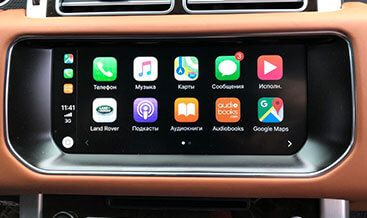
Apple CarPlay and Android Auto Pack unlocks the full factory Smartphone‑Pack functionality for DOIP‑based JLR Defender L663 vehicles. However, numerous base‑ and mid‑spec Defender infotainment units contain compatible touch‑screen hardware and wiring, yet CCF feature flags lock out Apple CarPlay and Android Auto projection. As a result, drivers cannot run smartphone navigation, streaming‑audio apps or native voice assistants directly from the Pivi Pro display. If you want to build a full premium media cabin, pair this retrofit with our Meridian Surround Sound System 825W. It merges smartphone mirroring with high‑fidelity multi‑channel vehicle audio output. This service validates centre‑console high‑speed USB data‑port hardware. In turn, it enables Apple CarPlay and Android Auto source‑selection menus alongside steering‑wheel media‑control compatibility.
First of all, smartphone‑mirroring functions will not activate by simply plugging in a USB cable. Next, our technicians inspect the existing centre‑console USB ports and harness integrity to confirm data‑capable circuitry. In case charge‑only ports are fitted, compatible OEM USB hardware will be installed. After that, our jlrcoding team completes a comprehensive DOIP diagnostic scan. We enable apple‑carplay‑and‑android‑auto‑pack Smartphone‑Pack feature flags within the vehicle CCF configuration file. Furthermore, we perform multi‑parameter adaptation for IAM infotainment‑master‑module, ACM audio‑control‑module and BCM body‑control‑module. Once coding finishes, the infotainment system recognises compliant smartphones over certified USB cables. Meanwhile, steering‑wheel controls handle media skip, voice‑command trigger and call‑answer inputs. For this reason, check our Wireless device charging to add convenient cable‑free phone power alongside wired projection capability.
This retrofit validates or supplies OEM high‑speed USB data port assemblies, vehicle‑specific wiring pigtails and all required mounting fasteners. The IAM manages smartphone‑pack protocol decoding and graphic‑frame routing for the Pivi Pro touch‑screen. Subsequently, media‑stream, call‑status and user‑input signals travel over CAN‑FD bus toward ACM and BCM modules. Users connect a compatible smartphone using a certified USB‑data cable. Once recognised, the infotainment switches over to the CarPlay or Android Auto projected interface. Drivers access navigation, messaging, music streaming and native voice‑assistant functions without handling the handset. All projection behaviour strictly complies with original JLR factory Smartphone‑Pack specifications. Notably, the system preserves factory Bluetooth telephony alongside the projected smartphone apps. Even so, CarPlay and Android Auto menu entries stay hidden even with correct USB‑hardware fitted. Rather, they require authorised DOIP multi‑module programming plus infotainment source‑mapping calibration to become fully operational. Finally, you can combine this infotainment upgrade with Interactive Driver Display (TFT cluster) to view incoming call and media metadata within the digital instrument panel.
This Apple CarPlay and Android Auto Pack retrofit suits 2020+ Defender L663 90, 110 and 130 models. The vehicle must have Pivi Pro infotainment hardware and provision for data‑capable centre‑console USB ports. Therefore, submit your VIN number first. We inspect existing IAM, ACM and BCM firmware revisions before commencing any hardware or programming work.
Local work includes partial centre‑console trim removal for USB‑port inspection and potential hardware replacement. Technicians fit data‑capable USB assemblies where required and secure harness connections. In some cases, base‑level vehicles need supplementary wiring upgrades to satisfy JLR high‑speed USB‑signal requirements. When hardware validation or replacement finishes, we create a secure backup of your original CCF file. We activate the Smartphone‑Pack feature flags. Then we execute infotainment source‑mapping calibration and audio‑routing parameter tuning. Last of all, we clear all infotainment‑connectivity‑related DTC fault codes.
You can pair local fitting with our worldwide remote coding service. Remote sessions require a DOIP‑VCI or Enet Type‑C cable. In short, follow the standard jlrcoding remote‑service workflow.
Every retrofit starts with pre‑install diagnostic health‑check and original CCF backup. After coding completes, we verify USB‑device detection, projected‑interface rendering and steering‑wheel‑control responsiveness. Importantly, fitting data‑capable USB hardware alone cannot deliver fully‑compliant factory Apple CarPlay and Android Auto Pack functionality.
Otherwise, incomplete adaptation or mis‑configured source‑mapping creates missing menu entries, intermittent phone‑connection drops or persistent infotainment‑connectivity DTC fault codes. Ultimately, once fully calibrated, this OEM‑spec upgrade brings familiar smartphone‑app integration into your Defender cabin. It works well for highway commuters, family‑shared vehicles and Defender overland‑focused owners.
XF 2021+
XF 2021+
XF 2021+

XF 2021+
XF 2021+
XF 2021+
XF 2021+