Sign up now
Join now and unlock your hidden features and OEM upgrading experiences.
You must be logged in to submit the form.

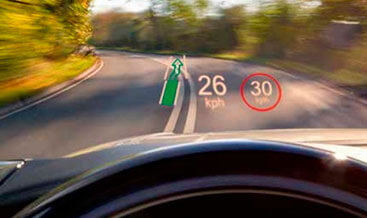
Head‑Up Display HUD Retrofit & OEM DOIP Coding | JLR Windshield Projection Upgrade
Our Head‑Up Display package delivers genuine OEM TFT‑LCD HUDCM projector retrofit and activation for modern DOiP‑architecture Jaguar Land‑Rover EVA2.0 vehicles. Furthermore, many chassis already contain dashboard mounting space and CAN‑FD bus routing for the head‑up‑display projector assembly, some even pre‑fitted with the combiner‑layer HUD‑compatible windscreen.
Meanwhile, numerous base‑trim variants omit the HUDCM projector unit, dedicated wiring harness and required CCF build‑flags. Simply installing the projector hardware alone will not enable complete windshield‑projection functionality, and ghosting will occur without correct combiner‑spec glass.
Therefore, without validated CCF configuration, HUDCM, IPC instrument‑cluster, IMC infotainment‑master‑controller, BCM and GWM gateway cannot synchronise driver‑information‑domain signals. As a result, HUD setting menus remain hidden within Pivi Pro, and HUD‑related DTC fault codes may populate on the vehicle bus. In addition, our technicians use official Pathfinder diagnostics to apply validated CCF edits for full Head‑Up Display operation across CAN‑FD networks.
JLR OEM Head‑Up Display (HUD) is a TFT‑LCD windshield‑projection peripheral managed primarily by the HUDCM Head‑Up‑Display‑Control‑Module. First of all, the dashboard‑mounted projector reflects rendered graphics onto the special combiner‑film windscreen, creating a virtual floating image in the driver’s forward line‑of‑sight.
It exchanges CAN‑FD status frames with IPC instrument‑cluster, IMC, BCM, GWM, powertrain and ADAS controllers. HUDCM ingests real‑time data for vehicle speed, selected gear, navigation turn‑by‑turn prompts and ADAS warning notifications. Ambient‑light‑sensor inputs drive automatic brightness‑adjustment for daylight and night‑time driving conditions.
Next, drivers can adjust projection vertical offset, brightness and visible‑content filter via steering‑wheel controls or within Pivi Pro settings menu. Moreover, HUD preferences can store inside driver‑profile memory for automatic recall on user‑profile selection.
Additionally, correct combiner‑layer windscreen hardware is mandatory to eliminate projection ghosting artefacts. Even so, physical projector and windscreen hardware alone cannot activate this complete HUD feature‑set.
Instead, your vehicle CCF build‑file must declare that full Head‑Up‑Display hardware is physically fitted. Conversely, generic third‑party coding cannot replicate JLR factory projection‑offset calibration, brightness‑mapping or CAN‑FD data‑routing parameters.
Poor‑quality configuration will trigger intermittent HUDCM‑IPC‑IMC DTC faults, distorted projection output or missing HUD‑setting menu entries. For this reason, our programming strictly follows official JLR workshop technical standards.
We only apply approved CCF‑flag changes and avoid irreversible HUDCM ECU‑flash operations. In turn, instrument‑cluster, navigation and Pivi‑Pro infotainment functions remain fully intact after coding completion.
Once hardware fitment, projector optical calibration and DOIP configuration finish, Head‑Up Display runs strictly to original JLR factory specifications. Most importantly, OEM‑spec windshield‑projected driver‑information becomes fully operational, including speed, gear position, navigation guidance and ADAS warning alerts.
Drivers gain native Pivi Pro HUD‑setting‑menu access to adjust projection height, brightness and select displayed content. Besides that, ambient‑light‑driven auto‑brightness and driver‑profile memory recall for HUD preferences are fully functional.
The HUD‑system‑status and projection‑metadata signals transmit correctly across the CAN‑FD bus without communication conflicts. At the same time, existing instrument‑cluster and ADAS warning‑routines retain full operational compatibility.
This retrofit‑activation service supports DOiP EVA2.0 Jaguar Land‑Rover platforms mechanically compatible with OEM HUDCM head‑up‑display hardware. Supported models include New Range Rover L460, Range Rover Sport L461, Defender L663, Velar L560 and Discovery 5 L462.
On one hand, some vehicles already hold complete HUDCM projector and combiner‑windscreen hardware and only require pure software activation. On the other hand, other base‑spec variants need the full HUD retrofit kit including projector, harness and HUD‑spec windscreen. Notably, units without compatible dashboard mounting geometry or non‑compliant HUDCM‑IMC firmware cannot use this upgrade.
Before technicians start physical or coding‑work, we run a full pre‑upgrade diagnostic scan. It validates module firmware versions, CAN‑FD bus health and Head‑Up‑Display hardware‑eligibility status.
To begin with, we perform a full diagnostic scan across HUDCM, IPC, BCM, IMC and GWM. We capture existing driver‑information‑system DTC fault codes and confirm baseline CAN‑FD network health status.
Our technicians install OEM HUDCM TFT‑LCD projector unit, wiring‑harness adaptors and combiner‑layer windscreen where hardware is missing. They complete all connector terminations and earth‑point connections per JLR workshop instrument‑panel and windscreen‑fitment procedures.
After mechanical fit‑out and hardware validation finishes, we execute official Pathfinder DOIP CCF programming plus mandatory HUD optical‑projection‑offset calibration. This step enables Head‑Up‑Display build flags and synchronises all relevant modules on the vehicle CAN‑FD network.
Afterwards, we verify projected‑image clarity, auto‑brightness performance and Pivi Pro HUD‑setting‑menu entry. Finally, we clear all residual fault‑codes and run final HUD‑system validation before customer hand‑over.
XF 2021+
XF 2021+
XF 2021+
XF 2021+
XF 2021+
XF 2021+