
Sign up now
Join now and unlock your hidden features and OEM upgrading experiences.
You must be logged in to submit the form.

JLR OEM‑grade instrument cluster – specs, wiring, TOPIx calibration and instant ordering.
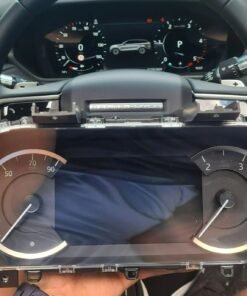
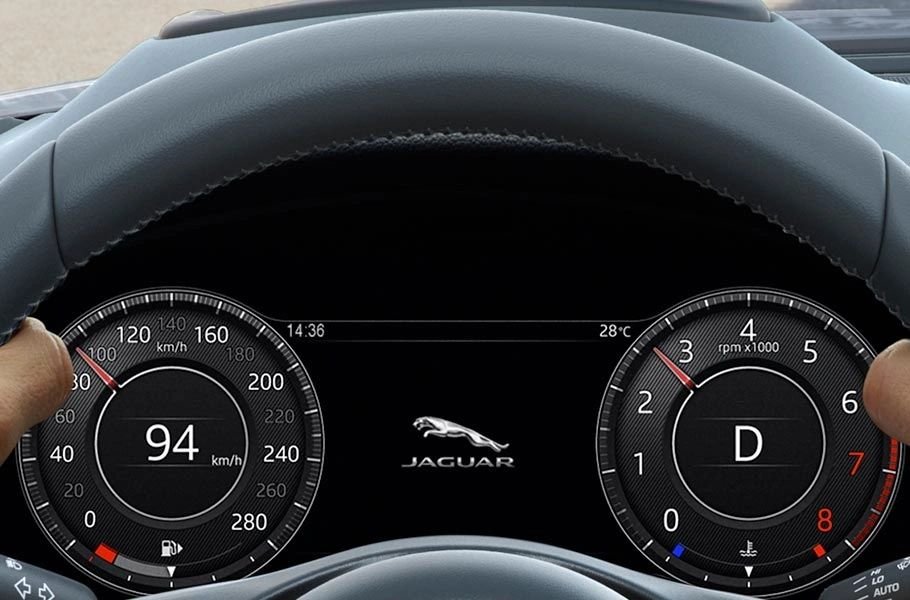
The Digital Drivers Display is the factory‑specified 12.3‑inch TFT instrument cluster introduced on Jaguar & Land Rover vehicles from the 2023 model year onward. It replaces analogue gauges with a fully configurable digital layout (speed, RPM, fuel, navigation, ADAS alerts, etc.) and communicates with the vehicle via CAN‑FD.
OEM part number: JPLA‑22I043‑BP. The module is calibrated at the factory to JLR’s “Speed‑Law” algorithm and includes a built‑in ambient‑light sensor for automatic brightness control.
The Digital Drivers Display receives power and data through the steering‑column harness. Key pins are colour‑coded as follows:
| Pin | Signal | Colour | Function |
|---|---|---|---|
| 1 | +12 V (BCM) | Red | Power to cluster electronics |
| 2 | Ground | Black | Chassis ground |
| 3‑10 | CAN‑FD High‑Speed (H) | Green/Yellow | Vehicle data (speed, RPM, etc.) |
| 11‑12 | LIN Low‑Speed | Blue | Ambient‑light sensor bus |
| 13‑14 | Diagnostic TX/RX | Purple/Orange | TOPIx flash interface |
| 15‑24 | Reserved | Grey | Future‑proofing |
All signals are protected by a 2 A fuse (F210) at the Body Control Module (BCM) fuse block. The cluster must be mounted to the steering‑column bracket and grounded to meet EMI requirements.
JLR Enet Wi‑Fi adapter into the OBD‑II port.DigitalClusterEnabled. In a non‑MY23+ build it will be 0.DigitalClusterEnabled to 1.C0A30‑96 – Digital Cluster Plausibility must be cleared.| Tool | Purpose | OEM Part / Link |
|---|---|---|
| JLR Enet Wi‑Fi Adapter | DOIP communication for TOPIx | APS‑D07‑001 |
| TOPIx Engineering Access | CCF edit & cluster calibration | Daily/Weekly Subscription |
| 70 A + Battery Maintainer | Voltage stability during flash | Standard automotive supplier |
| Steering‑Column Harness (24‑pin) | Physical connection for the cluster | APS‑D15‑006 |
Yes – as long as the BCM contains the “DigitalClusterEnabled” flag (present on all 2022‑2025 platforms). After installing the hardware, the TOPIx enable‑and‑calibration steps must be performed.
The display draws a maximum of 1.8 A (≈ 22 W). When the vehicle is off the BCM removes power, so the impact on fuel consumption is negligible.
When installed with the correct TOPIx calibration, it enjoys the standard 12‑month/12 000 km warranty. Keep the calibration checksum as evidence of proper installation.
The primary fault is C0A30‑96 – Digital Cluster Plausibility. After re‑enabling the cluster and confirming speed‑law calibration, the code can be cleared.
Select the exact part number that matches your VIN. The cluster ships sealed in a static‑free bag, ready for immediate installation.
Our JLR‑qualified engineers are on‑call 24 / 7. Fill out the short form and we’ll reply within one hour.
You must be logged in to post a review.
OEM Upgrade
OEM Upgrade
OEM Upgrade
OEM Upgrade

OEM Upgrade
OEM Upgrade
OEM Upgrade
OEM Upgrade


Reviews
There are no reviews yet.