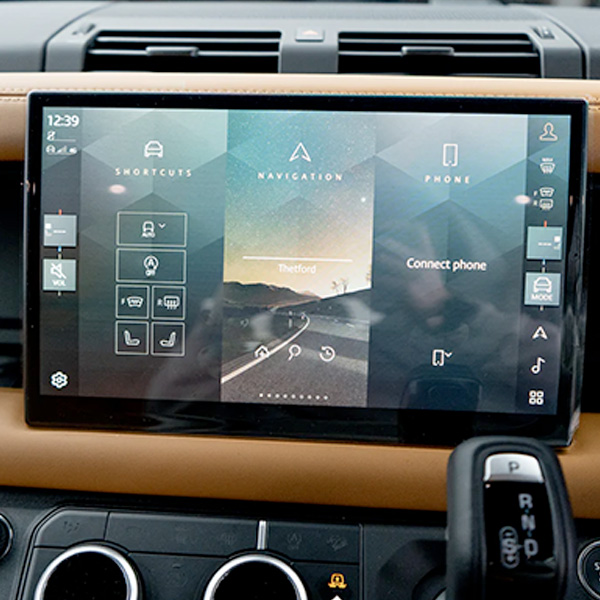
Defender L663 – Pivi Pro MY25 Interface Activation
Short description: We provide a factory‑grade activation of the Pivi Pro infotainment interface on Land Rover Defender L663 MY25. The service includes wiring, JLR ECU coding, OTA enablement and full functional testing.
Technical Overview
Land Rover installs the Pivi Pro head‑unit hardware as a latent option on every 2025 Defender L663. Consequently, the vehicle already contains the touchscreen, radio‑frequency module and high‑speed CAN‑bus channels required for Android‑Auto, Apple‑CarPlay and over‑the‑air (OTA) software updates. However, the factory disables the software activation flag unless the buyer selects the full Pivi Pro package. Therefore, technicians must run a dedicated activation service to unlock the interface.
Hardware that ships on MY25 Defender L663
- Pivi Pro infotainment module – part
8U1450 - High‑speed CAN‑bus harness with spare TCU and VCU channels
- Dual‑band Wi‑Fi/4G modem (optional OTA hardware)
- Front‑facing USB‑C port and Bluetooth 5.0 antenna
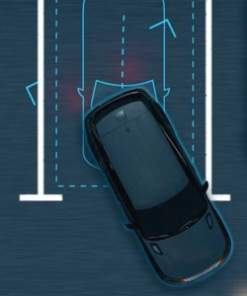
- Rear‑view camera connector used for parking assistance
Why Activate the Pivi Pro Interface?
Three reasons motivate owners to enable Pivi Pro on a MY25 Defender:
- Enhanced connectivity: Android‑Auto and Apple‑CarPlay give drivers instant access to navigation, music and messaging, thereby reducing distraction.
- Future‑proof software: OTA updates keep the infotainment system current with the latest JLR features and security patches, so the vehicle stays up‑to‑date without a dealership visit.
- Higher resale value: A fully‑functional Pivi Pro system attracts premium buyers, especially in the luxury‑SUV market.
Eligibility & Fitment Checks
We limit activation to Defender L663 MY25 builds that contain the Pivi Pro hardware. Before we start, the workshop must verify the following items:
- The VIN shows a 2025 build (year code “Z”).
- The infotainment ECU part number matches
8U1450and the firmware version is 7.02 or newer. - The high‑speed CAN‑bus shield remains intact (visible under the centre console).
- The optional OTA modem is installed if the customer wants remote updates.
If any item is missing, we supply the required part and fit it as a separate parts‑and‑labour package.
Activation Procedure – Step‑by‑Step
- Pre‑service verification: We connect a JLR
TechToolcable to the OBD‑II port, launch the “Infotainment” module and confirm the ECU part number and firmware level. - Hardware audit: We open the centre console, locate the Pivi Pro module and ensure the CAN‑bus plug seats firmly.
- Software enable: In
TechTool → Vehicle Setup → Infotainmentwe select “Activate Pivi Pro Interface”. The tool writes the activation flag to theIAMECU and flashes the latest Pivi Pro firmware (v1.5.3) if necessary. - OTA configuration (optional): If the vehicle carries the 4G modem, we enable “Remote Update” and enter the owner’s JLR account credentials.
- Feature validation: We power up the head‑unit and verify that:
- Android‑Auto appears in the source list and connects to a test smartphone.
- Apple‑CarPlay launches correctly when an iPhone plugs into the USB‑C port.
- OTA update check completes without error using the “Check for Updates” function.
- Documentation: We export a complete activation report (VIN, timestamps, ECU versions) and hand the customer a printed “Pivi Pro Activation Certificate”.
Benefits for Workshops & Fleet Operators
- High‑margin service: We charge £389 + VAT for a full activation that covers diagnostics, firmware flashing, OTA setup and certification.
- Standardised workflow: The same coding routine applies to every MY25 Defender, therefore training time stays low.
- Regulatory compliance: Enabling OTA ensures that security updates meet UK/EU automotive standards.
- Customer loyalty: We differentiate your service centre by offering a factory‑grade infotainment upgrade, which encourages repeat business.
Pricing & Ordering Information
Our standard package includes:
- Full diagnostic session with JLR
TechTool. - Pivi Pro activation flag and firmware update.
- Optional OTA configuration (included at no extra cost when hardware is present).
- Functional verification of Android‑Auto, Apple‑CarPlay and OTA.
- Electronic activation report and printed certificate.
- 12‑month warranty on all coding and software work.
Price: £389 + VAT. Additionally, if the customer needs the OTA modem, we offer the kit (part 8U1472) for £129 + VAT.
To place an order, we ask you to complete the JLRCoding contact form, select “Defender L663 – Pivi Pro MY25 Interface Activation” and attach a copy of the vehicle’s Service History or VIN verification.
Frequently Asked Questions (FAQ)
- Do I need any physical hardware to activate Pivi Pro?
- No – the hardware ships on all MY25 Defenders. The service only switches on the software flag. If the OTA modem is missing, we can add it as an optional kit.
- Can you reverse the activation?
- Yes – we use the same diagnostic tools to clear the activation flag, returning the vehicle to its original state without affecting other systems.
- Is there a warranty on the activation?
- Yes – we provide a 12‑month warranty that covers any coding errors or firmware issues. Moreover, all hardware components remain under the standard JLR parts warranty.
- Will the activation affect my insurance?
- Most insurers treat the added connectivity as a neutral feature and do not change premiums. Nevertheless, you may wish to inform your provider of the upgrade.
Contact JLRCoding Support
Email: support@sx-tool.com
Phone: +86 13823784841
Blog page description: Step‑by‑step guide to activating the Pivi Pro interface on Land Rover Defender L663 MY25. Includes hardware checklist, JLR coding, OTA setup and functional testing.
Blog page tags: Defender Pivi Pro activation, MY25 interface enable, Land Rover Defender infotainment upgrade, Pivi Pro coding, OTA update enable, JLR TechTool, JLRCoding