Skip to content
  • Newsletter

    Sign up now

    Join now and unlock your hidden features and OEM upgrading experiences.

    You must be logged in to submit the form.

  • $0.00
    • No products in the cart.

      Return to shop

JLR CODINGJLR CODING
Type C USB
Home / Range Rover Accessories

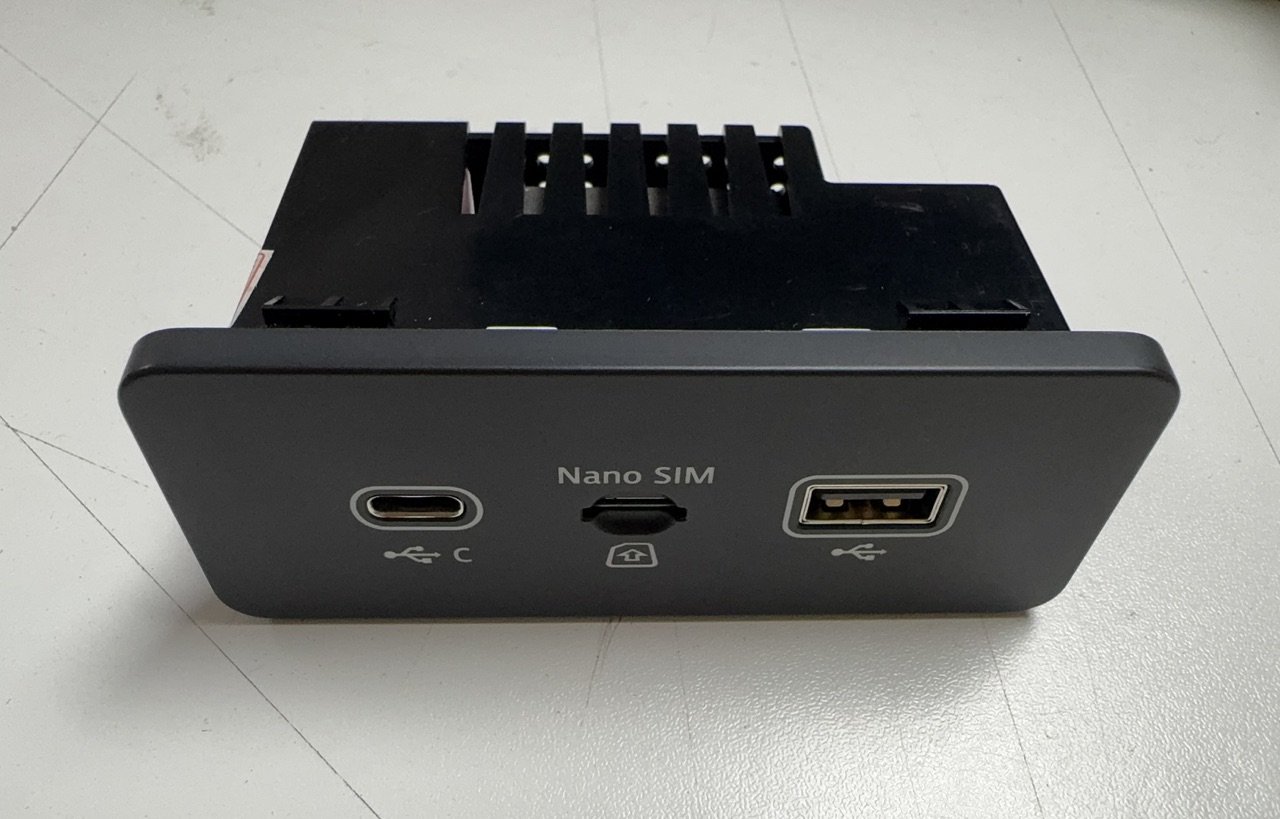
JLR CarPlay AndroidAuto Upgrade Type C USB Media Package

  • Land Rover 700W Audio Amplifier

$179.00

JLR Apple CarPlay Androidauto upgrade module. the activation demand OEM JLR VCI kit like DOIP to work with Pathfinder software, for the latest models MY2019-2021 you could activation CP AA without upgrading the IMC module firmware.

SKU: Type C USB Category: Range Rover Accessories Tags: carplay, JLR CCF, JLR DoIP VCI WF, jlr enet wifi, JLR JET MASTER
  • Land Rover 700W Audio Amplifier
Products
  • Features Activations
  • Files for JLR
  • Hardware for JLR
  • Jaguar Activation
    • Jaguar E-Pace X540
    • Jaguar E-Pace X540
    • Jaguar F-Pace X761
    • Jaguar F-Pace X761
    • Jaguar F-Pace X761
    • Jaguar F-Type X152
    • Jaguar I-Pace X590
    • Jaguar I-Pace X590
  • JLR Soft
  • Land Rover Activation
    • Defender L663
    • Discovery L462
    • Discovery Sport L550
    • Evoque L551
    • Range Rover L405
    • Range Rover L460
    • Rover Sport L460
  • OEM Upgrade
    • Defender L663
    • Discovery 5 2021+
    • Discovery Sport 2021+
    • E-Pace 2021+
    • Evoque 2012-15
    • Evoque 2016-19
    • F-Pace 2016-20
    • F-Pace 2021+
    • I-Pace 2018-20
    • I-Pace 2021+
    • New Evoque 2019-20
    • Range Rover 2018-21
    • RR Sport 2023+
    • Velar 2021+
    • XF 2021+
  • Performance Upgrade
  • Range Rover Accessories
    • Defender 110
    • Defender 90
    • Defender 90
  • Range Rover Activation
    • RRS L494
    • Velar L560
  • Remote Support
  • Software for JLR
  • Spare Parts
  • Subscription
  • Tool Kit
  • Uncategorized
  • Description
  • Additional information


JLR CarPlay AndroidAuto Upgrade Type C USB Media Package

For JLR technicians addressing the growing demand for smartphone integration, upgrading to modern Type C USB modules requires precise CCF editing beyond physical installation. The Car Configuration File (CCF) governs all infotainment functions, and improper coding of new CarPlay and Android Auto modules leads to functionality gaps or system errors. Using the JET (JLR Engineering Tool) ecosystem solves the critical challenge of integrating new hardware with existing vehicle networks while maintaining OEM performance standards. This guide details the professional methodology.

Technical Architecture of JLR Smartphone Integration Systems

USB Module Evolution & System Integration

Modern JLR vehicles utilize a dedicated USB module (JLR part LR124772) that serves as the communication bridge between mobile devices and the head unit. The transition to Type C USB modules enables:

  • Higher data transfer rates (USB 3.1 Gen 1 at 5Gbps)
  • Simultaneous CarPlay and Android Auto support
  • Reverse camera feed integration via USB-C

Successful integration requires three technical processes:

  1. Hardware Authentication: Module registration via TOPIx Cloud security gateway
  2. CCF Parameterization: Configuring USB attributes in Vehicle Dynamic Module (VDM)
  3. Network Initialization: Enabling HS-CAN communication between USB module and Touch Pro Duo

Required Tools & Interfaces

  • Diagnostic Hardware: JLR Enet WiFi or DOIP VCI (MongoosePro JLR2)
  • Software: SX-Tool Engineering Suite or Pathfinder with CCF editing
  • Power Management: 30A regulated power supply (>13.2V)
  • Security Access: Active TOPIx subscription with engineering privileges
  • Networking: Stable Ethernet connection for cloud authentication

Step-by-Step Upgrade Procedure

  1. Hardware Installation:
    • Replace legacy USB hub with Type C module (center console removal required)
    • Connect to quadlock connector (pins 17-18 for HS-CAN, pins 1-2 for power)
    • Secure fiber-optic MOST connection (if equipped with Meridian audio)
  2. Pre-Coding Preparation:
    • Connect JLR Enet WiFi adapter
    • Maintain >13.2V with power supply
    • Launch SX-Tool > Select vehicle architecture (Evoque L538, Range Rover L405, etc.)
  3. CCF Coding Sequence:
    • Navigate: VDM Configuration > External Device Interface
    • Change “USB Protocol Version” to 3.1
    • Enable “CarPlay/Android Auto Dual Support”
    • Set “USB Data Transfer Mode” to HS-CAN
    • Configure pin assignments per wiring diagram
  4. Security Initialization:
    • Connect to TOPIx Cloud via SX-Tool
    • Submit module security certificate request
    • Apply JLR server-generated authorization token
  5. Validation:
    • Perform VDM reset through engineering menu
    • Test both CarPlay and Android Auto functionality
    • Verify charging capability (15W PD minimum)

Common Challenges & Technical Solutions

Challenge 1: “Device Not Supported” Error
Solution: Verify CCF coding matches USB module generation. MY2017+ requires “USB 3.1 Gen1” setting.

Challenge 2: Intermittent Connection Drops
Solution: Check HS-CAN termination resistance (60Ω between pins 6-14). Replace quadlock connector if corroded.

Challenge 3: CarPlay Activates But Android Auto Fails
Solution: Enable “Dual OS Support” in VDM CCF coding. Update head unit firmware to SOTA version.

Challenge 4: TOPIx Security Authentication Failure
Solution: Confirm VIN is eligible for upgrade. MY2016-2018 may require gateway module update.

Compatibility Reference

Vehicle Model Minimum SW Version Required CCF Changes
Range Rover (L405) IDD 188.240 VDM USB Protocol, HS-CAN Activation
Range Rover Sport (L494) IDD 178.340 USB Power Management, Dual OS Support
Discovery (L462) IDD 202.100 Pin Assignment, Charging Profile
Evoque (L538) IDD 152.670 MOST Network Configuration (if equipped)

USB Module & CCF Coding FAQs

Can I retrofit Type C USB without SX-Tool?

No. JLR's component protection system requires SX-Tool or Pathfinder engineering functions for module authorization.

Why does my new module only charge but not transfer data?

Check HS-CAN wiring and termination. Verify “Data Transfer Mode” is set to HS-CAN in VDM CCF coding.

Is TOPIx Cloud mandatory for all upgrades?

For MY2019+ vehicles, yes – security authentication requires online validation. Pre-2019 models may use offline coding.

What's the maximum power delivery for Type C modules?

OEM modules support 15W (5V/3A) by default. 27W (9V/3A) requires CCF modification in Power Management settings.

Professional Implementation Standards

Successful USB module upgrades demand precision in both hardware installation and software configuration:

  • Always perform CCF backup before modification
  • Verify HS-CAN network integrity with oscilloscope if possible
  • Use genuine JLR USB modules to avoid compatibility issues
  • Update vehicle firmware to latest SOTA version before coding
  • Validate both CarPlay and Android Auto functionality post-installation

Experience SX-Tool Engineering Capabilities

Test our professional JLR coding suite with full demo access:
SX-Tool JLR Engineering Software Demo
Includes USB module coding templates and CCF editors

Tags: JLR CarPlay upgrade, Android Auto retrofit, Type C USB module, SX-Tool, CCF coding, JLR Enet WiFi

Long-tail Keywords: how to code jlr usb module for carplay, install android auto on range rover with sx-tool, fix usb not recognized after jlr upgrade, configure type c usb land rover, jlr enet wifi diagnostics setup

Yoast SEO Premium Configuration

Focus Keyphrase: USB Module,carplay,android,sx-tool,ccf,coding,jlr enet wifi
Related Keyphrases: jlr carplay upgrade, land rover android auto retrofit, sx-tool ccf editing
Meta Description: Professional guide to JLR CarPlay/Android Auto upgrades with Type C USB modules. Learn CCF coding procedures, SX-Tool configurations, and Enet WiFi diagnostics.

For OEM-grade JLR diagnostic solutions, engineering software, and expert support on vehicle integration projects, explore our specialized tools and resources at jlrcoding.com – your technical partner in advanced JLR programming and retrofit systems.


Weight 1 kg

Related products

Hot Stone Massage
+
Quick View

Range Rover L405

Land Rover Range Rover L405 activates Hot Stone Massage

$299.00
Park Assist
+
Quick View

Discovery L462

Land Rover Discovery L462 activates Park Assist

$299.00
Global Window Close
+
Quick View

Rover Sport L460

Land Rover New Range Rover Sport L460 activates Global Window Close

$299.00
P360 to P400 Power Upgrade
+
Quick View

Rover Sport L460

Land Rover New Range Rover Sport L460 activates P400 Power Upgrade

$299.00
Configurable Dynamics
+
Quick View

Defender L663

Land Rover Defender L663 activates Dynamic Mode

$299.00
Adaptive Cruise Control
+
Quick View

Discovery Sport L550

Discovery Sport L550 activates Adaptive Cruise Control

$299.00
SV Bespoke Welcome Screen
+
Quick View

Defender L663

Land Rover Defender L663 activates SV Bespoke

$299.00
SV Autobiography Dash
+
Quick View

Defender L663

SV Autobiography Dash Activation

$299.00

20/F HO KING COMM CTR 
2-16 FA YUEN ST
MONGKOK HONG KONG

Call us E-mail

Engineering Solution

  • SX-TOOL 2017-25
  • SX-CAN 2006-19
  • JET-PRO 2017-25
  • CCF TOOL 5.0

Our Service

  • OEM Activation
  • Retrofit Upgrade
  • ToolKit
  • Spare Parts

Support

  • Contact Us
  • Return & Refund
  • Blog
  • Shipping Policy

©
2026 UX Themes

Terms Privacy Cookies
Copyright 2026 © Jaguar Land Rover Coding Flashing, Powered by SX TOOL CO LTD
  • Land Rover Activations
    • New Defender Activations L663
    • Range Rover Sport Activations L461
    • Range Rover Activations L460
    • Discovery 5 Activations L462
    • Range Rover Activations L405
    • Range Rover Activations L494
    • Range Rover Activations L560
  • Jaguar Activations
  • Retrofit Parts
  • Tool Kit
  • Contact Us
  • News

Login

Lost your password?