Sign up now
Join now and unlock your hidden features and OEM upgrading experiences.
You must be logged in to submit the form.

Our Head‑Up Display package delivers genuine OEM colour HUD projector installation and activation for modern DOiP‑architecture Jaguar Land‑Rover EVA2.0 vehicles. In fact, many base‑trim chassis have compatible instrument‑cluster networking, yet they leave production without the dedicated HUD projector unit, combiner‑layer windscreen, modified upper‑dash aperture trim and matching CCF build‑data flags for windshield‑projection functionality.
Even if you physically mount the HUD projector unit, this standalone hardware fit‑out will not enable full factory‑spec colour projected driver‑information. Instead, without validated DOIP CCF configuration, HPC HUD‑processor, IPC instrument‑panel‑cluster, DADC driver‑assist‑domain‑controller, IMC and GWM gateway cannot synchronise instrument‑domain CAN‑FD signals. As a result, HUD configuration controls remain hidden inside Pivi Pro instrument‑settings menu, and instrument‑related DTC fault‑codes may populate. Therefore, our technicians utilise official Pathfinder diagnostics to apply validated HUD‑related CCF edits for complete Head‑Up Display operation across vehicle CAN‑FD instrument networks.
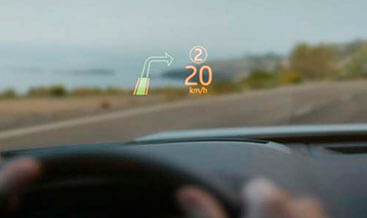
JLR OEM colour Head‑Up Display (HUD) is a driver‑information peripheral managed primarily by the HPC HUD‑processor module. Specifically, the high‑contrast colour TFT projector reflects graphical content onto the special combiner‑layer windscreen, projecting virtual driving‑data within the driver’s forward line‑of‑sight.
Furthermore, the system exchanges CAN‑FD instrument‑domain status frames with IPC, DADC, IMC and GWM gateway modules. HPC receives real‑time vehicle datasets including road‑speed, gear position, navigation turn‑by‑turn guidance, traffic‑sign‑recognition output and ADAS warning events. Meanwhile, it renders formatted colour graphics and transmits projection commands to the physical projector hardware. In addition, integrated ambient‑light‑sensing automatically adjusts HUD brightness to match external lighting‑conditions for reduced driver‑distraction.
Generally speaking, drivers can adjust projection height, rotation and brightness levels via Pivi Pro instrument‑settings. In other words, projector hardware alone cannot function correctly unless the windscreen features the required HUD combiner‑layer; standard glass will distort projected imagery. First of all, your vehicle CCF build‑file must declare that Head‑Up‑Display hardware is physically fitted. Conversely, generic third‑party coding cannot replicate JLR factory HUD‑graphical‑mapping, brightness‑calibration tables or CAN‑FD instrument‑data‑routing‑parameters.
If configuration is completed incorrectly, intermittent HPC‑IPC‑DADC DTC faults, distorted projection or missing HUD‑menu‑entries will occur. For this reason, our programming strictly adheres to official JLR TOPIx workshop technical standards. Moreover, we apply only approved CCF‑flag modifications and avoid irreversible HPC ECU‑flash‑operations. Meanwhile, existing interactive‑driver‑display, navigation and ADAS warning‑functions remain fully intact after coding‑completion.
Once HUD‑projector fitment, combiner‑windscreen validation and DOIP configuration finish, Head‑Up Display runs strictly to original JLR factory‑specifications. Notably, colour windscreen‑projection of road‑speed, gear status, navigation lane‑guidance, traffic‑sign‑recognition and ADAS alert notifications become fully operational.
Additionally, drivers gain native Pivi Pro instrument‑settings‑menu access to fine‑tune HUD projection height, angle and automatic brightness‑behaviour. On top of that, ambient‑light‑linked auto‑dimming operates according to OEM specification. Instrument‑domain metadata‑signals transmit reliably across CAN‑FD instrument‑bus with zero communication‑conflicts, while existing interactive‑driver‑display and driver‑assistance routines retain full‑operational‑compatibility.
This retrofit‑activation‑service supports DOiP EVA2.0 Jaguar Land‑Rover platforms mechanically compatible with OEM Head‑Up Display HPC and projector hardware. For instance, supported models include New Range Rover L460, Range Rover Sport L461, Defender L663, Velar L560 and Discovery 5 L462.
Some vehicles already contain the projector unit and HUD‑compatible windscreen and only require pure software‑activation. On the other hand, other base‑spec vehicles need the complete Head‑Up‑Display retrofit‑kit including projector, HUD‑combiner‑layer windscreen, dash‑trim and CAN‑FD harness‑segments. In contrast, units without compatible dash‑mount geometry or non‑compliant HPC‑IPC‑DADC firmware cannot support this upgrade. Besides that, non‑HUD standard windscreens cannot deliver correct projected‑image output.
Before technicians commence physical‑or‑coding‑work, we run a full pre‑upgrade diagnostic‑scan. Specifically, it validates module‑firmware‑versions, CAN‑FD instrument‑bus health and Head‑Up‑Display hardware‑eligibility‑status by reading vehicle as‑built CCF‑data.
To start with, we perform a full diagnostic‑scan across HPC, IPC, DADC, IMC and GWM. We capture existing instrument‑system DTC fault‑codes and confirm baseline CAN‑FD instrument‑network health‑status.
After that, our technicians install OEM colour‑TFT HUD‑projector, combiner‑layer windscreen and dash‑trim assemblies plus CAN‑FD harness adaptors where hardware is missing. All connector‑terminations and dashboard‑trim removal follow JLR instrument‑system refitting‑procedures.
Once mechanical fit‑out and hardware‑validation finish, we execute official Pathfinder DOIP CCF programming enabling Head‑Up‑Display build‑flags and synchronise all relevant‑modules on the vehicle CAN‑FD instrument‑network.
Subsequently, we verify projected‑image quality, brightness‑auto‑dimming‑performance and Pivi Pro instrument‑settings‑menu entry. Lastly, we clear all residual fault‑codes and run final HUD instrument‑system validation before customer‑hand‑over.
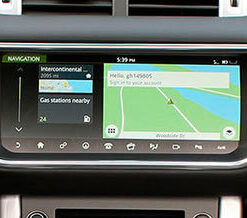
Evoque 2016-19
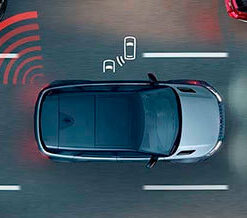
Evoque 2016-19

Evoque 2016-19
Evoque 2016-19
Evoque 2016-19
Evoque 2016-19
Evoque 2016-19
Evoque 2016-19