Sign up now
Join now and unlock your hidden features and OEM upgrading experiences.
You must be logged in to submit the form.

Head‑Up Display
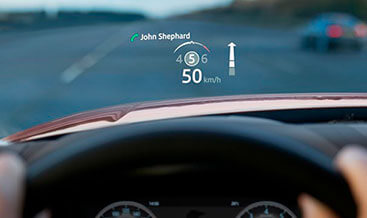
Head‑Up Display (HUD) delivers genuine OEM projected driver‑information onto the combiner‑type windscreen for DOIP‑based JLR Defender L663 vehicles. However, many mid‑trim Defender units roll out without the HUDCM projector assembly and the special combiner‑layer windscreen. Even when physical hardware is retro‑fitted, locked CCF feature flags prevent projected content output. As a result, drivers must repeatedly divert eyes from the road to read speed, navigation prompts and ADAS warnings from the instrument cluster or Pivi Pro screen. If you aim for a complete driver‑information ecosystem, pair this retrofit with our Interactive Driver Display (TFT cluster). It synchronises cluster graphics with HUD projected overlays for consistent driver feedback. This kit supplies genuine OEM HUDCM projector unit, combiner‑spec windscreen assembly, dashboard mounting brackets and dedicated CAN‑FD wiring pigtails. In turn, it unlocks projected vehicle speed, turn‑by‑turn navigation, adaptive‑cruise status and ADAS alert overlays with ambient‑light‑linked automatic brightness dimming.
First of all, full Head‑Up Display projected functionality will never activate from projector and windscreen hardware swap alone. Next, technicians perform partial dashboard teardown to install the HUDCM projector module beneath the instrument panel. They fit the OEM combiner‑layer windscreen and secure all CAN‑FD power‑communication harness connectors. After that, our jlrcoding team completes a comprehensive DOIP diagnostic scan. We enable head‑up‑display feature flags inside the vehicle CCF configuration file. Furthermore, we complete multi‑parameter adaptation for HUDCM head‑up‑display‑module, IPC instrument‑cluster‑module, IAM infotainment‑master‑module, DADC driver‑assist‑domain‑controller, BCM body‑control‑module and GWM gateway‑module. Once coding finishes, the HUDCM receives graphic data streams from IPC and DADC. Meanwhile, auto‑brightness reacts to exterior ambient‑light sensor inputs and user‑adjustable projection height settings become available within Pivi Pro menus. For this reason, check our Adaptive Cruise Control with Stop Go if you wish to feed ACC gap‑and‑speed status data onto your HUD projection area.
This retrofit provides OEM HUDCM projector assembly, combiner‑integrated windscreen, dashboard mounting hardware, CAN‑FD wiring adapters and all required fastening components. The HUDCM renders graphic frames then projects images onto the internal combiner layer embedded within the windscreen. Subsequently, driver‑data, navigation‑frames and ADAS‑status messages travel over CAN‑FD bus from IPC, IAM and DADC toward HUDCM, BCM and GWM modules. Once enabled, drivers adjust projection height, rotation and brightness via the infotainment settings menu. Visible content includes road speed, navigation turn prompts, ACC set‑speed, following‑gap indicator and active ADAS warning pop‑ups. Ambient‑light sensor input triggers automatic dimming for night‑time driving. All projection timing, content prioritisation and brightness‑response behaviour strictly complies with original JLR factory L663 specifications. Notably, a standard non‑combiner windscreen cannot produce sharp HUD imagery and will cause ghosting or blurred projection. Even so, projected graphics and Pivi Pro HUD‑configuration menu remain dormant after purely mechanical hardware fitment. Rather, they require authorised DOIP multi‑module programming plus HUD optical projection‑alignment calibration to operate correctly. Finally, combine this safety‑focused driver‑info upgrade with Blind Spot System for combined ADAS situational‑awareness improvements.
This Head‑Up Display retrofit suits 2020+ Defender L663 90, 110 and 130 models. The vehicle must offer physical dashboard mounting space for HUDCM and support GWM‑managed CAN‑FD domain‑backbone architecture. Therefore, submit your VIN number first. We inspect existing HUDCM‑compatible IPC, IAM, DADC, BCM and GWM firmware revisions before dashboard and windscreen replacement work commences.
Local workshop tasks include partial dashboard trim removal, HUDCM projector installation and combiner‑spec windscreen replacement. Technicians route and lock CAN‑FD harness connections for the projector module. In some cases, base‑trim vehicles require supplementary wiring upgrades to satisfy JLR HUD high‑speed data‑communication requirements. When hardware installation finishes, we create a secure backup of your original CCF file. We activate the head‑up‑display feature flags. Then we execute HUD projection‑offset alignment, brightness‑response parameter tuning and multi‑module graphic‑stream synchronisation. Last of all, we clear all hud‑related DTC fault codes.
You can pair local fitting with our worldwide remote coding service. Remote sessions require a DOIP‑VCI or Enet Type‑C cable. In short, follow the standard jlrcoding remote‑service workflow.
Every retrofit starts with pre‑install diagnostic health‑check and original CCF backup. After coding completes, we verify projection sharpness, auto‑brightness response, navigation‑and‑ADAS overlay rendering and Pivi Pro HUD‑menu visibility. Importantly, hardware‑only HUD‑projector and windscreen fitment cannot deliver fully‑compliant factory Head‑Up Display functionality.
Otherwise, incomplete adaptation or mis‑aligned projection parameters produce missing overlay content, blurred projected imagery or persistent hud‑related DTC fault codes. Ultimately, once fully calibrated, this OEM‑spec upgrade improves driver focus and highway‑safety. It works well for highway commuters, long‑distance travellers and Defender overland‑focused owners.
Evoque 2016-19
Evoque 2016-19
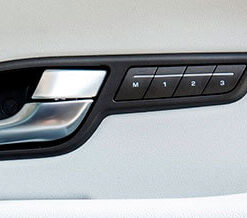
Evoque 2016-19
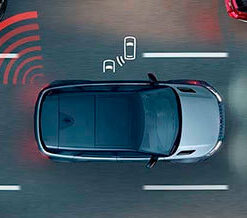
Evoque 2016-19

Evoque 2016-19
Evoque 2016-19
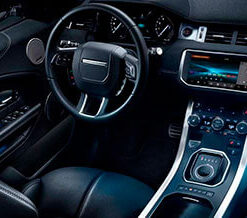
Evoque 2016-19
Evoque 2016-19