Sign up now
Join now and unlock your hidden features and OEM upgrading experiences.
You must be logged in to submit the form.

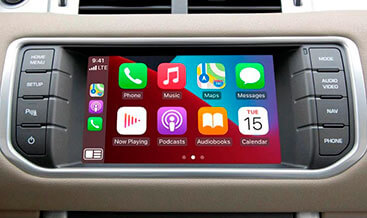
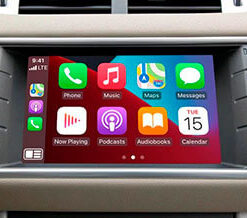
Our Apple CarPlay and Android‑Auto InControl Touch / Touch‑Plus package delivers official OEM Smartphone‑Pack feature activation for DOiP‑architecture Jaguar Land‑Rover vehicles fitted with InControl Touch or Touch‑Plus infotainment hardware. Many EVA2.0 vehicles contain full IMC infotainment‑master‑controller, TCU telematics‑control‑unit and functional USB‑media‑bus hardware but the Smartphone‑Pack option is disabled in factory CCF build‑data.
Base‑spec InControl Touch / Touch‑Plus head‑units physically support CarPlay and Android‑Auto but menu tiles and smartphone projection are hidden by build‑configuration. Simply connecting a compatible smartphone via USB will not bring up projection‑functionality without valid CCF configuration and infotainment domain synchronisation.
Without validated CCF parameter‑edits, IMC, TCU telematics unit, BCM and GWM gateway cannot synchronise InControl media‑bus signals. As a result CarPlay / Android‑Auto menu entries remain absent within InControl Touch‑Plus settings, and media‑bus‑related DTC fault‑codes may populate. Our technicians utilise official Pathfinder diagnostics to apply validated Smartphone‑Pack CCF flags for complete Apple CarPlay and Android‑Auto operation across CAN‑FD infotainment networks.
JLR OEM Apple CarPlay and Android‑Auto (Smartphone‑Pack) is an InControl Touch / Touch‑Plus infotainment‑domain feature managed primarily by the IMC Infotainment‑Master‑Controller working alongside the TCU telematics‑control‑unit. The vehicle‑mounted USB‑media‑bus provides physical high‑speed data‑communication between compatible iOS / Android handsets and the InControl Touch‑Plus head‑unit.
It exchanges CAN‑FD infotainment‑domain status frames with BCM body‑controller, TCU and GWM gateway modules. Once Smartphone‑Pack is enabled, IMC validates USB‑device enumeration, handles handset projection‑protocol translation and renders CarPlay / Android‑Auto graphical output onto the native InControl Touch‑Plus touch‑screen display.
Next, the system supports touch‑screen control, steering‑wheel media‑switch inputs and integrated voice‑assistant pass‑through for Siri and Google Assistant. Audio routing mixes navigation prompts, media‑playback and hands‑free‑telephony through the vehicle’s factory audio‑amplifier hardware. Projection‑functionality activates upon certified USB‑cable connection of compliant smartphones.
Additionally, the feature co‑exists alongside native InControl navigation, DAB radio and Bluetooth streaming without conflict. Even so, intact InControl Touch / Touch‑Plus USB‑media‑bus hardware alone cannot activate this complete Smartphone‑Pack feature‑set.
Your vehicle CCF build‑file must declare that the Smartphone‑Pack (CarPlay / Android‑Auto) option is fitted. Generic third‑party coding cannot replicate JLR factory IMC media‑bus‑handshake parameters, USB‑device‑profile filtering or infotainment‑diagnostic‑threshold‑tables.
Poor‑quality configuration triggers intermittent IMC‑TCU DTC faults, missing projection‑menu‑tiles or unstable smartphone‑handset‑connection‑behaviour. Our programming adheres strictly to official JLR TOPIx workshop technical standards.
We apply only approved CCF‑flag changes and avoid irreversible IMC / TCU ECU‑flash‑operations. Existing InControl Touch‑Plus radio, Bluetooth‑telephony and native navigation functions remain fully intact once coding completes.
Once CCF Smartphone‑Pack configuration, infotainment‑domain synchronisation and post‑coding system‑validation finish, Apple CarPlay and Android‑Auto run strictly to original JLR factory‑specifications. Most importantly certified‑USB‑cable‑triggered smartphone projection becomes fully‑operational within InControl Touch / Touch‑Plus infotainment system.
Drivers gain native InControl settings‑menu access for Smartphone‑Pack configuration, handset‑device‑management and projection‑feature toggling. Besides that, steering‑wheel media‑controls, touch‑screen interaction and native voice‑assistant pass‑through work for both Apple CarPlay and Android‑Auto compliant mobile‑devices.
The InControl media‑bus‑status and smartphone‑projection‑metadata‑signals transmit correctly across the CAN‑FD infotainment‑bus without communication‑conflicts. At the same time, existing DAB‑radio, Bluetooth‑hands‑free‑calling and native InControl navigation routines retain full‑operational‑compatibility.
This activation‑service supports DOiP EVA2.0 Jaguar Land‑Rover platforms equipped with fully‑functional InControl Touch or Touch‑Plus IMC‑TCU USB‑media‑bus hardware. Supported models include New Range Rover L460, Range Rover Sport L461, Defender L663, Velar L560 and Discovery 5 L462.
On one hand, many vehicles already hold complete InControl Touch / Touch‑Plus infotainment‑hardware and only require pure Smartphone‑Pack software‑activation. On the other hand, units with incomplete USB‑media‑bus wiring, non‑compliant IMC‑firmware or missing TCU telematics‑hardware cannot support this upgrade. Notably, older non‑DOiP pre‑EVA2 platforms are outside service‑scope.
Before technicians commence coding‑work, we run a full pre‑upgrade diagnostic‑scan. It validates module‑firmware‑versions, CAN‑FD infotainment‑bus health and Smartphone‑Pack hardware‑eligibility‑status via reading vehicle as‑built CCF‑data.
To begin with, we perform a full diagnostic‑scan across IMC, TCU, BCM and GWM. We capture existing InControl infotainment‑system DTC fault‑codes and confirm baseline CAN‑FD infotainment‑network health‑status.
Our technicians validate vehicle as‑built configuration and confirm intact USB‑media‑bus hardware functionality for InControl Touch / Touch‑Plus. We verify IMC and TCU firmware compatibility before making configuration‑changes.
After hardware‑eligibility‑validation‑finishes, we execute official Pathfinder DOIP CCF programming enabling Smartphone‑Pack CarPlay‑Android‑Auto build‑flags and synchronise all relevant‑modules on the vehicle CAN‑FD infotainment‑network.
Afterwards, we verify USB‑device enumeration, projection‑menu‑tile appearance and InControl infotainment‑system‑behaviour. Finally, we clear all residual fault‑codes and run final infotainment‑system validation before customer‑hand‑over.
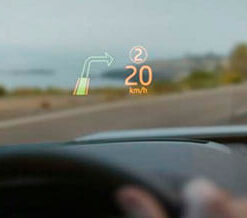
Evoque 2016-19
Evoque 2016-19
Evoque 2016-19

Evoque 2016-19
Evoque 2016-19
Evoque 2016-19
Evoque 2016-19
Evoque 2016-19