Sign up now
Join now and unlock your hidden features and OEM upgrading experiences.
You must be logged in to submit the form.

Apple CarPlay and Android Auto InControl Touch, Touch Plus
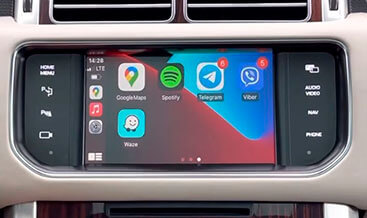
Apple CarPlay and Android Auto brings the factory Smartphone‑Pack to JLR InControl Touch and Touch‑Plus infotainment hardware. Many JLR vehicles leave the factory with compatible touch‑screen hardware but disabled smartphone‑mirroring features. Owners cannot run phone navigation, music apps or voice assistants natively on the vehicle display. If you upgrade your in‑car media setup, pair this retrofit with our Meridian Sound System 400W. It delivers complete high‑quality audio plus smartphone‑connected functionality. This service validates your existing InControl Touch or Touch‑Plus hardware and required USB data ports. It unlocks native Apple CarPlay and Android Auto menu entries within the main infotainment interface.
First, smartphone‑mirroring functions will not activate from USB‑cable connection alone. Technicians inspect centre‑console USB data‑port hardware and harness integrity. Some vehicles require updated USB‑module fitment for correct data communication. Next, our jlrcoding team runs a full DOIP diagnostic scan. We enable smartphone‑pack CCF feature flags inside the configuration file. We also complete parameter adaptation for IAM infotainment‑master‑module, ACM audio‑control‑module and BCM body‑control‑module. After coding finishes, the system detects connected phones via supported USB cable. It also displays CarPlay‑Android‑Auto source selection menus. For extra cabin device convenience, check our Wireless device charging.
This retrofit validates your existing InControl Touch or Touch‑‑Plus touch‑screen unit, centre‑console high‑speed USB data ports and wiring harness. Supplementary USB‑module hardware can be supplied if your base unit lacks data‑capable circuitry. The IAM manages smartphone‑pack protocol handling and source switching. Status and media‑stream status signals travel over CAN‑FD bus to ACM and BCM modules. Users connect a compatible smartphone using an approved USB‑data cable. The infotainment touch‑screen switches to CarPlay or Android‑Auto interface. Drivers access maps, voice commands, messaging and streaming‑media apps directly from the vehicle display. All operation strictly matches original JLR Smartphone‑Pack factory specifications. Even after correct USB‑hardware fitment, smartphone‑mirroring menus stay inactive. They only work after approved DOIP multi‑module programming and feature‑flag activation. You can combine this infotainment upgrade with Three‑zone Climate Control for balanced cabin comfort and media features.
This Apple CarPlay and Android Auto InControl Touch, Touch‑Plus retrofit suits DOIP‑architecture JLR platforms including 2020+ Defender L663. The vehicle must carry genuine InControl Touch or Touch‑‑Plus infotainment hardware plus functional data‑capable USB ports. Send over your VIN number first. We check firmware versions on IAM, ACM and BCM before starting any hardware‑related work.
Local work includes centre‑console partial teardown for USB‑port inspection. Technicians replace USB‑modules if only charge‑only ports are fitted. They inspect and secure data‑harness connector points. Some base vehicles need partial wiring upgrades to meet JLR infotainment‑data‑signal requirements. Once hardware validation or replacement finishes, we save a backup copy of your original CCF. We activate the smartphone‑pack feature flags. Then we run IAM‑ACM‑BCM multi‑module parameter adaptation. Finally, we clear all infotainment‑connectivity‑related DTC fault codes.
You can pair local hardware‑check work with our worldwide remote coding service. Remote sessions require a DOIP‑VCI or Enet Type‑C cable. Follow the standard jlrcoding remote‑service workflow.
Every retrofit starts with a pre‑install diagnostic health‑check and CCF backup. After coding, we verify USB‑port data‑communication, phone‑detection response and CarPlay‑Android‑Auto menu visibility. Working USB‑hardware alone cannot enable fully‑compliant factory Smartphone‑Pack functionality.
Incomplete adaptation results in missing source‑menu entries or intermittent smartphone‑connection behaviour. It may also trigger infotainment‑connectivity DTC fault codes. Once calibrated, this OEM‑spec infotainment upgrade brings familiar smartphone‑app access. It works well for daily commuters, family‑users and Defender overland‑focused owners.
F-Pace 2021+
F-Pace 2021+

F-Pace 2021+
F-Pace 2021+

F-Pace 2021+
F-Pace 2021+
F-Pace 2021+
F-Pace 2021+