Sign up now
Join now and unlock your hidden features and OEM upgrading experiences.
You must be logged in to submit the form.

Apple CarPlay & Android Auto InControl Touch / Touch Plus Activation | OEM JLR Infotainment Upgrade
Our Apple CarPlay and Android Auto service provides software‑only activation. It also delivers complete hardware‑plus‑coding retrofit for DOiP‑enabled Jaguar and Land Rover vehicles fitted with InControl Touch or Touch‑Plus infotainment systems.
Many mid‑spec vehicles ship with fully capable IMC infotainment‑control‑module hardware. The USB media ports and internal processing hardware already support smartphone projection protocols.
Factory CCF trim‑level restrictions often lock the Smartphone‑Pack feature set. The infotainment menus hide CarPlay and Android‑Auto options even with compatible physical hardware in place.
We use certified Pathfinder DOIP programming. It updates IMC infotainment‑module, BCM body‑controller and GWM gateway CCF parameters to unlock full smartphone‑projection functionality.
For vehicles missing required IMC hardware or valid USB‑data harnesses, we supply genuine OEM infotainment components and bus‑wiring adaptors. Our OEM‑compliant setup maintains stable MOST‑CAN bus communication. It clears infotainment‑connectivity‑related DTC faults across all connected modules.
JLR OEM Apple CarPlay and Android‑Auto run on the IMC infotainment‑control‑module for InControl Touch and Touch‑Plus units. The IMC handles USB‑protocol communication and user‑interface rendering for smartphone projection.
This infotainment ECU translates touch‑screen inputs, steering‑wheel‑switch commands and voice‑control requests between the vehicle and connected mobile device. Status data shares across the MOST fibre‑optic network to audio amplifiers and instrument‑cluster IPC.
Compatible USB‑port hardware and working IMC firmware alone are not enough. Valid CCF build‑file flags must notify the vehicle network that the Smartphone‑Pack feature is authorised.
Multiple DOiP‑architecture JLR vehicles hold dormant CarPlay and Android‑Auto capability on mid‑range trim levels. Generic third‑party coding cannot align IMC feature‑mapping and USB‑communication threshold values with factory firmware.
Poor‑quality edits may trigger intermittent infotainment DTC faults. They can also cause dropped USB‑connections, frozen projection screens or break standard Bluetooth‑audio operation.
Our dealer‑level programming follows official JLR OEM infotainment technical specifications. We apply only validated CCF configuration flags for software‑activation jobs. We avoid permanent IMC ECU‑flash operations unless firmware updates are strictly required. All factory USB‑power‑safety rules and diagnostic‑logging routines stay intact. This protects long‑term IMC‑module and media‑port hardware reliability.
Once technicians finish coding and any physical‑hardware installation work, Apple CarPlay and Android‑Auto run strictly per official JLR factory specifications for InControl Touch / Touch‑Plus.
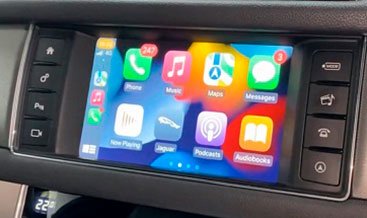
Connect your compatible iPhone or Android handset via certified USB‑data cable. The infotainment touch‑screen launches native CarPlay or Android‑Auto user‑interface automatically.
You gain access to navigation apps, hands‑free calling, messaging and streaming‑media services. Steering‑wheel controls and in‑built voice‑command buttons work with projected smartphone applications.
Projection mode co‑exists alongside native InControl radio and media functions. You can toggle between OEM vehicle menus and smartphone‑projection screens directly from the main home‑screen.
Every USB‑communication timing, app‑permission routing and audio‑mixing setting retains original OEM factory‑calibration values.
This Apple CarPlay & Android‑Auto upgrade supports DOiP‑capable JLR platforms fitted with InControl Touch or Touch‑Plus infotainment hardware.
Supported vehicles include New Range Rover L460, Range Rover Sport L461, Defender L663, Velar, Evoque and latest‑generation premium Jaguar models equipped with Touch / Touch‑Plus systems.
Some chassis roll‑off production pre‑fitted with fully‑compliant IMC and USB‑data port hardware. Other vehicles require infotainment‑module or USB‑harness retrofit kits to support smartphone‑projection protocols.
Before technicians start coding or retrofit tasks, our team completes a full pre‑program diagnostic scan. This scan validates IMC module firmware versions, MOST‑CAN bus stability and genuine Smartphone‑Pack hardware eligibility status including USB‑port functional health checks.
Our complete service workflow opens with multi‑module pre‑upgrade diagnostics covering IMC infotainment‑control‑module, BCM body‑controller and GWM gateway unit.
We inspect existing Bluetooth‑media and USB‑port performance. We read IMC diagnostic data where InControl Touch or Touch‑Plus hardware is present.
When valid genuine infotainment hardware supports the Smartphone‑Pack feature, technicians run official JLR Pathfinder DOIP CCF programming. This procedure enables CarPlay and Android‑Auto parameters and restores full smartphone‑projection functional logic.
For full‑retrofit assignments, technicians fit genuine OEM IMC‑module upgrades and compliant USB‑data‑harness assemblies plus corresponding bus‑wiring adaptors.
Next, we complete IMC‑module configuration, USB‑port communication validation and bus synchronisation before functional validation testing.
We verify USB‑device detection, CarPlay / Android‑Auto launch behaviour, steering‑wheel‑control response and menu‑toggle responsiveness. Lastly, technicians clear all residual fault‑codes to deliver consistent long‑term OEM‑standard Apple CarPlay & Android‑Auto performance on InControl Touch / Touch‑Plus.
Uncategorized

Uncategorized
Uncategorized

Uncategorized
Uncategorized
Uncategorized